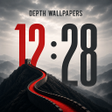
4K live clock wallpapers that add layered depth to Android screens
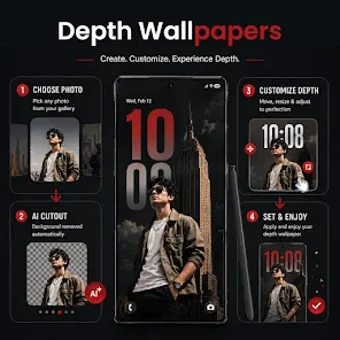
Depth Wallpapers 4k Live Clock, by Nilesh Jain, is an Android app that applies layered clock depth to device screens. It sets animated and static high-resolution wallpapers with a live clock placed behind foreground subjects, plus parallax motion and selectable clock styles. The app bundles 4K and HD imagery, AMOLED-friendly themes, customizable fonts, a 3D parallax effect, and one-tap application to both screens. It targets Android users seeking layered, iOS-style depth and active clock widgets for a more dynamic home experience.
What does Depth Wallpapers 4k Live Clock change about your desktop visuals?
The app moves the clock from an overlay to a background layer, placing it behind wallpaper subjects to create a multi-layered look on the home screen. It supports 4K and HD images and applies a 3D parallax effect so foreground elements shift with device motion. That combination changes the device's primary screens by integrating timekeeping into the wallpaper rather than adding a separate floating widget.
How much control does the app give over clock appearance and depth?
Clock customization is explicit and varied: users can pick from multiple styles, choose fonts and colors, and select digital or analog display types. The app also includes AMOLED-friendly themes and lets users apply a chosen wallpaper and clock to the home screen and the lock screen with a single tap. Basic adjustments are exposed without extra menus, and visual depth depends on the chosen image composition.
Does the app affect battery life or run-time performance?
Battery impact is addressed in the app design, which the developer describes as using optimized live wallpaper technology to reduce power draw. Because the tool supports 4K imagery and parallax motion, actual performance and power use depend on device capability and Android version. The app’s platform notes indicate requirements vary by device, so older or entry-level hardware may show different responsiveness than modern devices.
Is setup and daily use straightforward across Android devices?
Setup keeps a low technical bar, with a one-tap apply action for both primary screens and an on-device library of HD and 4K wallpapers. The developer has a portfolio of personalization tools and the app has a growing user base, which suggests active maintenance. Users report simple daily use: select an image, tweak clock style, and assign screens without installing extra launchers or system tools.
Practical choice for personalization users who accept some trial-and-error
Depth Wallpapers 4k Live Clock suits Android users who prefer decorative, device-integrated clock elements and per-image visual experimentation. Expect to try several wallpapers to achieve convincing foreground separation, and note that results vary by device capabilities and system version. For anyone aiming to add motion and layered clock elements to their screens, the app is a usable option with manageable setup and ongoing maintenance needs.